Reading handwritten postcodes
Training YOLO11s on synthetic postcards, then connecting it to a sorting arm.
Computer visionAman Singh, with two teammatesJune 202612 min read
Contents
- 1. Introduction
- 1.1 The problem
- 1.2 Motivation
- 1.3 Where it fits
- 2. Dataset
- 2.1 Postcard templates
- 2.2 Synthetic generation
- 2.3 Real handwritten postcards
- 2.4 Classes and splits
- 3. System design
- 3.1 Pipeline overview
- 3.2 Rectification
- 3.3 Orientation
- 3.4 Detection
- 3.5 Text extraction
- 3.6 Suburb lookup and output
- 4. Model
- 4.1 YOLO11s
- 4.2 Why YOLO11s
- 4.3 Training setup
- 5. Results
- 6. The app
- 6.1 Default and Advanced modes
- 6.2 Upload or camera
- 6.3 Reading the results
- 7. Limitations
- 8. Showcase and People's Choice
- 9. What's next
- Acknowledgements
- Appendix
- A.1 Per-class detection metrics
- A.2 Confusion matrices
- A.3 Training curves
- A.4 Validation predictions
- A.5 App screenshots
- References
Contents
- 1. Introduction
- 1.1 The problem
- 1.2 Motivation
- 1.3 Where it fits
- 2. Dataset
- 2.1 Postcard templates
- 2.2 Synthetic generation
- 2.3 Real handwritten postcards
- 2.4 Classes and splits
- 3. System design
- 3.1 Pipeline overview
- 3.2 Rectification
- 3.3 Orientation
- 3.4 Detection
- 3.5 Text extraction
- 3.6 Suburb lookup and output
- 4. Model
- 4.1 YOLO11s
- 4.2 Why YOLO11s
- 4.3 Training setup
- 5. Results
- 6. The app
- 6.1 Default and Advanced modes
- 6.2 Upload or camera
- 6.3 Reading the results
- 7. Limitations
- 8. Showcase and People's Choice
- 9. What's next
- Acknowledgements
- Appendix
- A.1 Per-class detection metrics
- A.2 Confusion matrices
- A.3 Training curves
- A.4 Validation predictions
- A.5 App screenshots
- References
LiPi is a web app that reads the postcode on a handwritten postcard. You upload a photo or hold a card up to a webcam, and LiPi straightens the image, works out which way up it is, finds the ten regions of a postcard with a fine-tuned YOLO11s detector, reads the postcode with OCR and looks up the matching NSW suburb. We connected it to a robotic arm, so the card can go from photograph to tray.
Real mail is full of personal details, so we didn't train on it. The training set is 1,200 synthetic postcards generated in Python, plus 110 real handwritten ones written by volunteers.
On validation, the detector reached an mAP50 of 0.995 and an mAP50-95 of about 0.88. Both numbers are for region detection: finding and labelling the ten postcard regions on the 124-image validation split (the dataset splits 1,066 / 124 / 120). They don't tell you how often LiPi reads the postcode correctly. We haven't measured end-to-end postcode reading accuracy.
Two teammates and I built it, then showed it at the AI Showcase at UTS Tech Festival 2026, where it won the People's Choice Award. The app is live on Hugging Face Spaces if you'd like to try it with your own postcard.
1. Introduction
1.1 The problem
Automated mail sorting already exists, but it's built for large postal operators with industrial sorting lines. Smaller organisations that receive mail still sort it by hand.
Reading a handwritten postcode from a photo is much harder than recognising digits in a clean dataset. The postcode sits inside a full handwritten address block. People photograph cards at an angle or in poor light, the card may be tilted or partly covered [1], and handwriting varies widely from writer to writer [2]. Our goal was a lightweight system that can take an ordinary photo of a postcard, find the postcode and read the correct four-digit NSW postcode despite all of that.
Finding where the postcode sits is a problem in its own right: earlier work used a deep CNN to detect the pincode for postal automation [5]. LiPi does the same detection step with YOLO11s before it reads the digits.
1.2 Motivation
We had two reasons. The practical one: university campuses, apartment complexes and community organisations handle a lot of mail but can't justify sorting infrastructure, so we wanted something that runs on a standard laptop and cuts down manual effort and sorting mistakes. The research one: could a model trained almost entirely on synthetic postcards hold up on messy real-world photos? Using real public mail as a dataset was never an option because of privacy, so the whole project depended on synthetic data being good enough.
1.3 Where it fits
In the app, you upload a photo or snap one with your camera and get back the detected postcode, its NSW suburb and the location of every other region on the card, in seconds. The obvious next step is a mailroom workflow where a camera scans incoming postcards and routes each one to the right tray, which is the job of the robotic arm we built (see section 9).
2. Dataset
The dataset was built in three stages and holds 1,310 postcard images: 1,200 synthetic and 110 real. Prior work shows that combining synthetic and real data improves generalisation in handwritten document recognition [3], and that's the approach we followed. It gave us a large, varied, labelled set without collecting hundreds of real home addresses.
2.1 Postcard templates
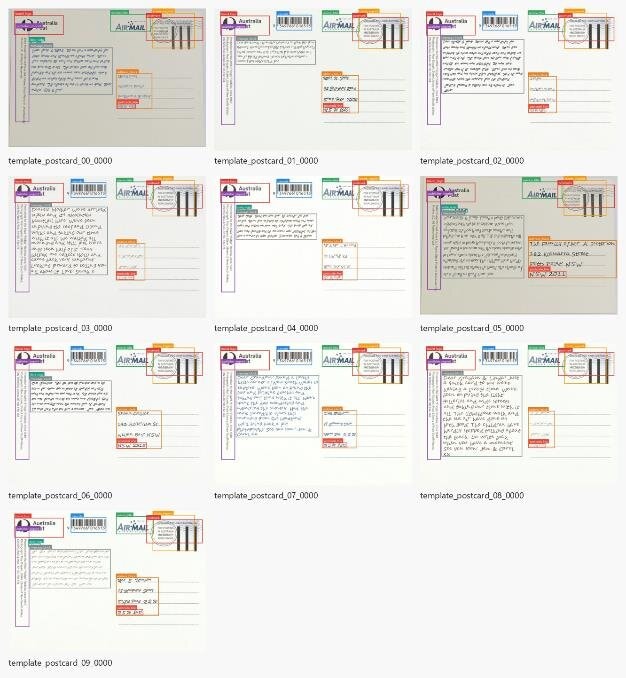
We visited several Australia Post branches and photographed blank NSW Air Mail postcards under different conditions. Eight real templates became the base for everything we generated.
2.2 Synthetic generation
Following the approach of synthetic OCR dataset generators [4], we built a generation pipeline in Python with Pillow that produced 1,200 postcards. Each one has handwritten-style content: a recipient address, a message and a date, rendered in handwriting fonts with random variation in character size, baseline and rotation. Stamps and postmarks are generated procedurally with varying placement and appearance, and the ink changes between blue ballpoint, black ink, dark grey pencil, green ink, dark red-brown ink and marker-style strokes.
Getting there took a lot of experimenting. Before settling on the final Pillow compositor, we tried compositing and overlaying augmented real postcard photos, and generating images with Nano Banana 2 and GPT-5.
2.3 Real handwritten postcards
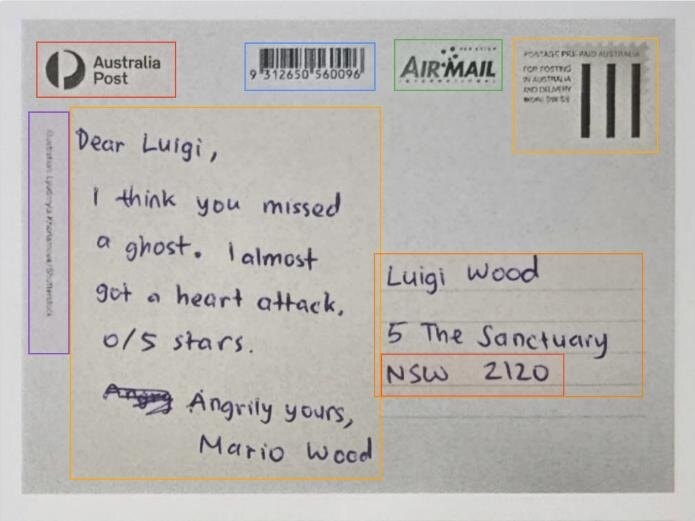
To cover genuine handwriting, eight people first wrote 84 postcards, which were photographed and annotated by hand in CVAT.ai using the YOLO format. We later wrote and labelled 26 more, bringing the real set to 110. The real samples went into the training and validation splits, while the original test set stayed unchanged so results remained comparable.
2.4 Classes and splits
Every postcard is annotated with ten classes: brand_logo, barcode, service_title, stamp_imprint, publisher_imprint, date_note, message_block, address_block, postcode_line and postmark. The final split is 1,066 training, 124 validation and 120 test images, roughly 80/10/10.
3. System design
3.1 Pipeline overview
LiPi runs every image through the same seven stages.
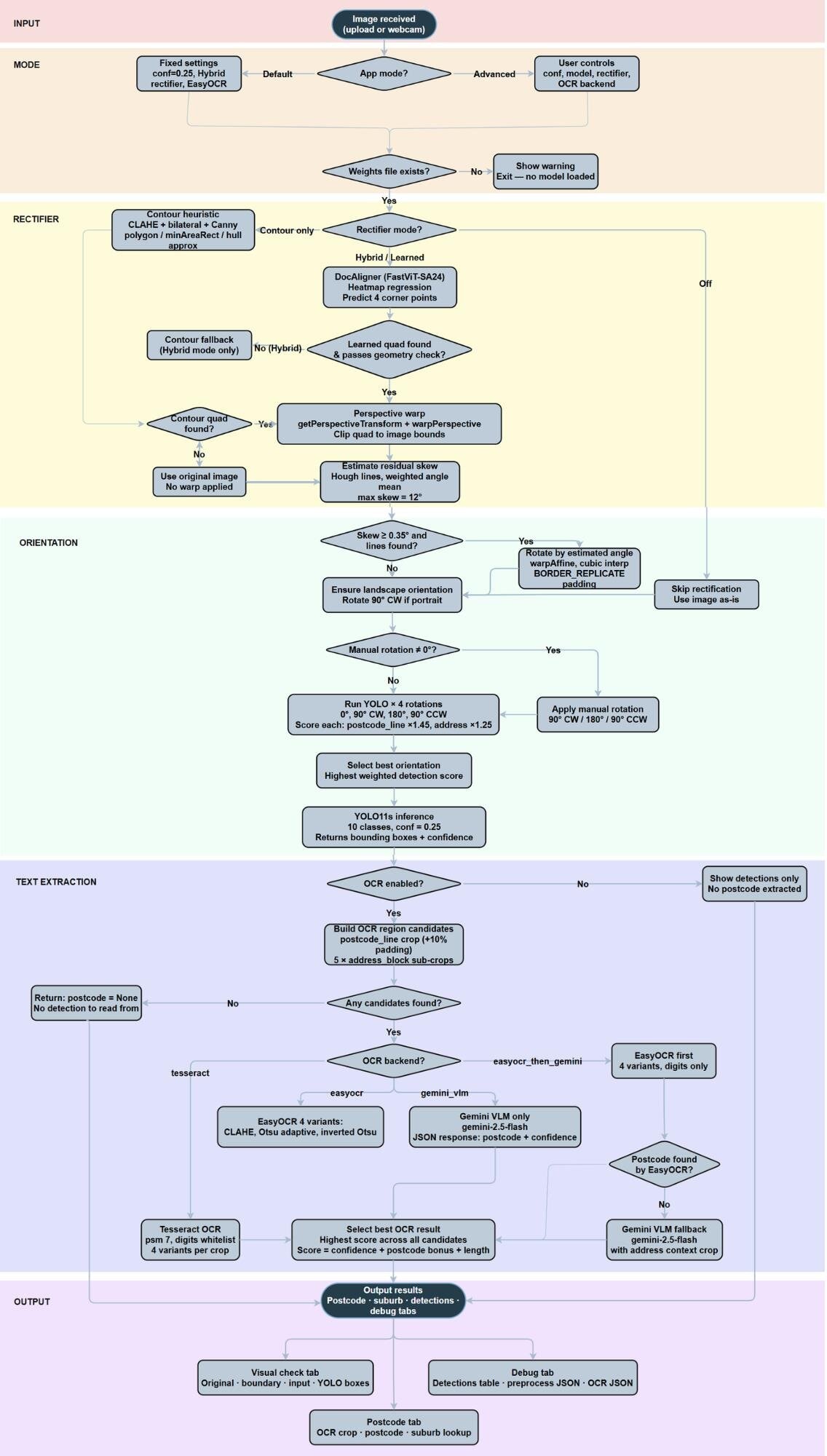
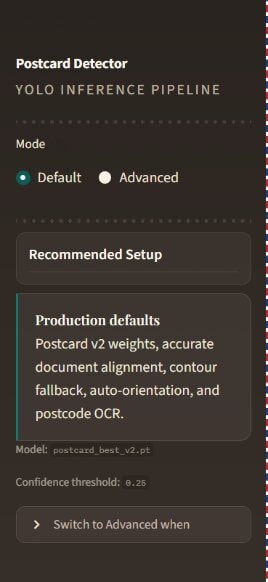
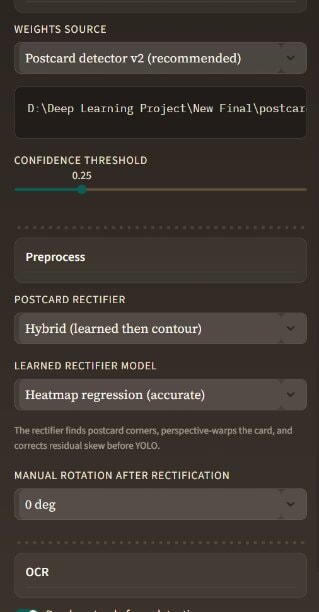
The app has two modes. Default uses fixed, recommended settings: the postcard detector v2 weights, a 0.25 confidence threshold, hybrid rectification and EasyOCR. Advanced exposes the controls: model weights, confidence threshold, rectifier strategy, manual rotation and OCR backend. Before anything runs, the app checks that the model weights exist. The full flowchart from our report shows every branch.
3.2 Rectification
The first job is turning a photo taken at an angle into a flat, front-facing postcard. In Hybrid or Learned mode, a DocAligner model (FastViT-SA24 heatmap regression) predicts the four corners of the card, and OpenCV's getPerspectiveTransform and warpPerspective warp it flat.
If the learned result fails a geometry check (a minimum area fraction of 0.18 plus a rectangularity score), a contour-based fallback takes over. It applies CLAHE contrast enhancement, bilateral denoising, Gaussian blur, several Canny edge thresholds, adaptive thresholding and morphological gradients to build candidate edge masks, then evaluates polygon approximations and minimum-area rectangles to find the best quad. If nothing valid is found, the original image is used. After warping, any leftover skew is estimated with a weighted Hough line analysis and corrected if it's more than 0.35 degrees, and the image is normalised to landscape.
3.3 Orientation
A flat postcard can still be upside down. Rather than train a separate orientation model, we run YOLO11s at all four cardinal rotations and score each run.
3.4 Detection
The correctly oriented image goes to YOLO11s at a confidence threshold of 0.25, which returns bounding boxes and confidences for the ten postcard classes.
3.5 Text extraction
OCR candidates come from the detected postcode_line crop (with about 10% padding) plus up to five sub-crops of the address_block. Each crop is upscaled 2.5× with bicubic interpolation and cleaned up with CLAHE and a Gaussian blur, then read in four variants: CLAHE enhanced, Otsu binary, adaptive threshold and inverted Otsu. Every result is scored on confidence, whether it looks like a valid postcode, and length, and the best one wins.
There are four OCR backends: EasyOCR, Tesseract, a Gemini or Groq vision-language model, or EasyOCR first with the VLM called only when EasyOCR finds no postcode. We evaluated Tesseract in depth against the other options, which shaped the final choice.
3.6 Suburb lookup and output
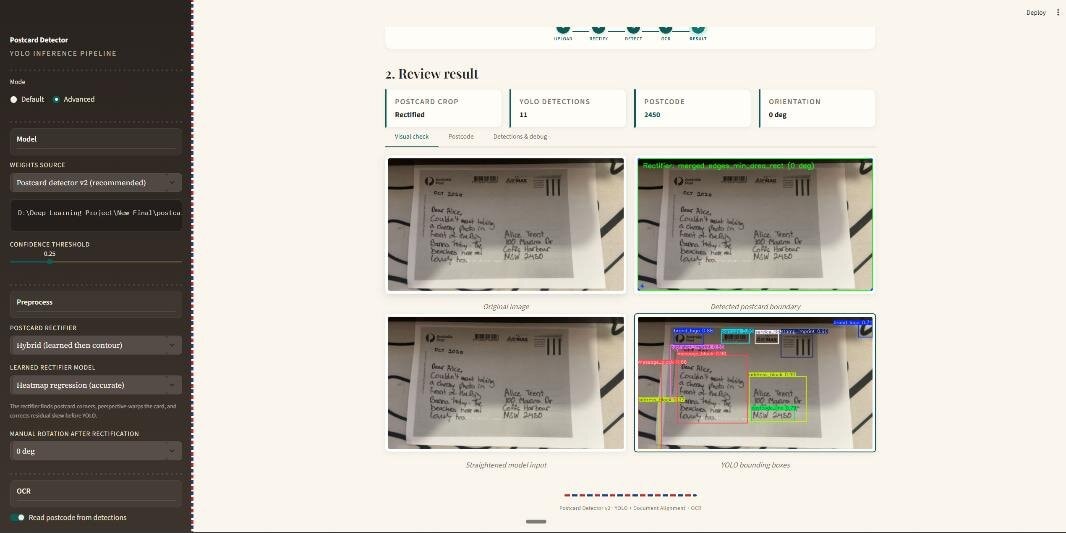
The postcode is matched against the Zippopotam.us API to get the NSW suburb. Results appear across three tabs: a visual check of every stage, the postcode with its suburb and raw OCR text, and a debug view with the full detections table and preprocessing and OCR logs.
4. Model
4.1 YOLO11s
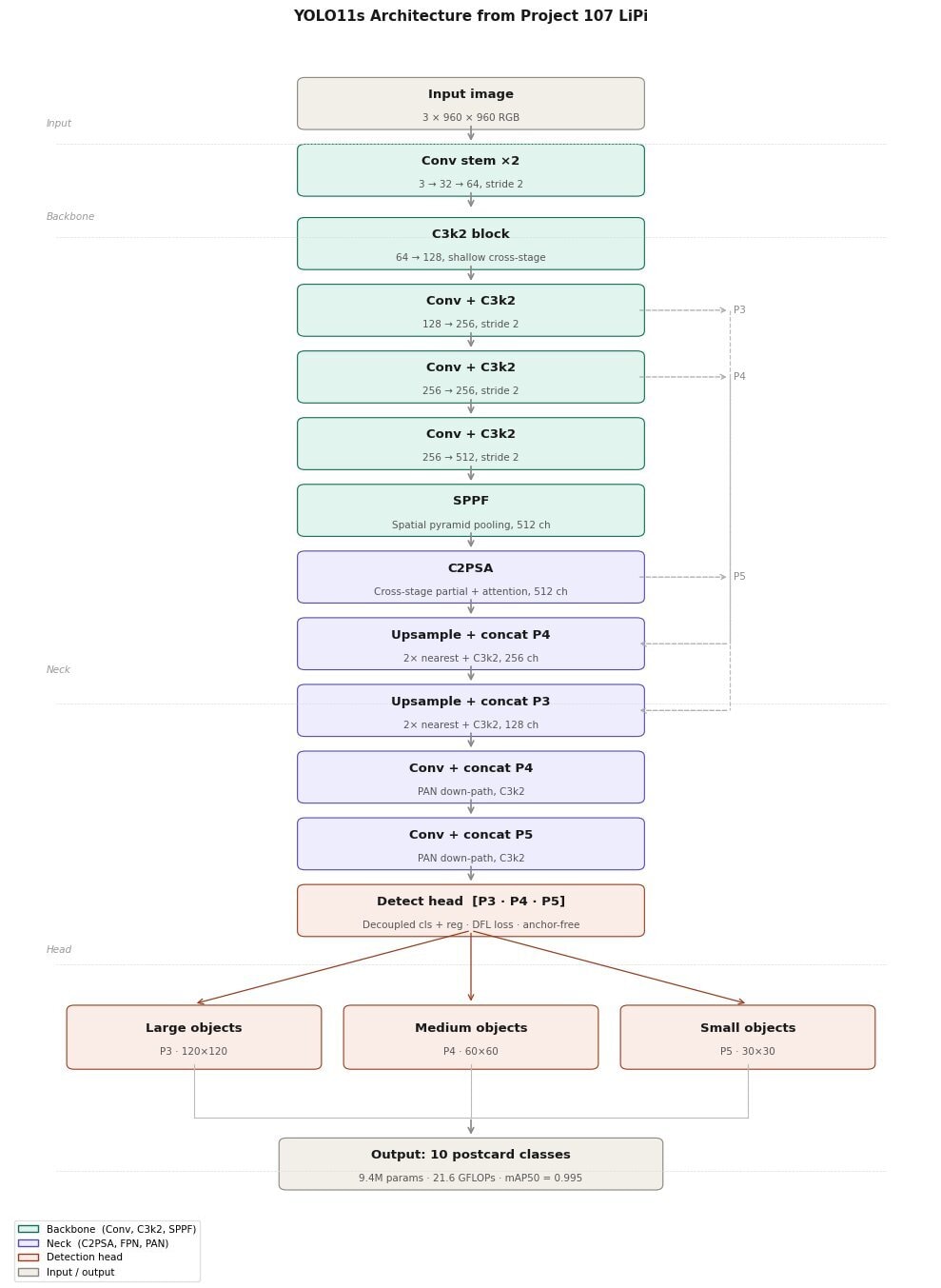
The detector is YOLO11s, the small variant of Ultralytics' YOLO11: a single-stage, anchor-free object detector with 182 layers, 9.4 million parameters and 21.6 GFLOPs. The backbone uses C3k2 blocks with SPPF and C2PSA attention modules, and the detection head predicts boxes at three feature scales. We started from COCO-pretrained weights and fine-tuned on the postcard dataset.
4.2 Why YOLO11s
We also tried Faster R-CNN and SSD using TorchVision. YOLO11s gave the best trade-off between speed and accuracy, and at 19.2 MB it runs comfortably on ordinary hardware with no specialised infrastructure. Along the way, we trained an early, smaller YOLO model that helped validate the detection approach, and tested on a smaller preview dataset and an augmented variant (tilts, blur, background clutter) before scaling up to the full 1,200 images.
4.3 Training setup
| Setting | Value |
|---|---|
| Base model | YOLO11s, pretrained on COCO |
| Image size | 960 × 960 |
| Batch size | 8 |
| Epochs | 75 |
| Optimiser | AdamW (lr 0.000714, momentum 0.9) |
| Weight decay | 0.0005 |
| Mixed precision | AMP |
| Dataset | 1,200 synthetic + 110 real handwritten |
| Workers | 2 |
| Device | Tesla T4 GPU (Kaggle) |
| Training time | about 8 minutes (0.135 hours) |
5. Results
Everything in this section measures region detection: how well YOLO11s finds and labels the ten postcard regions on the 124-image validation split. It does not measure whether LiPi reads the postcode correctly. We didn't build an exact-match benchmark for end-to-end postcode reading, so that accuracy is unknown (see section 7).
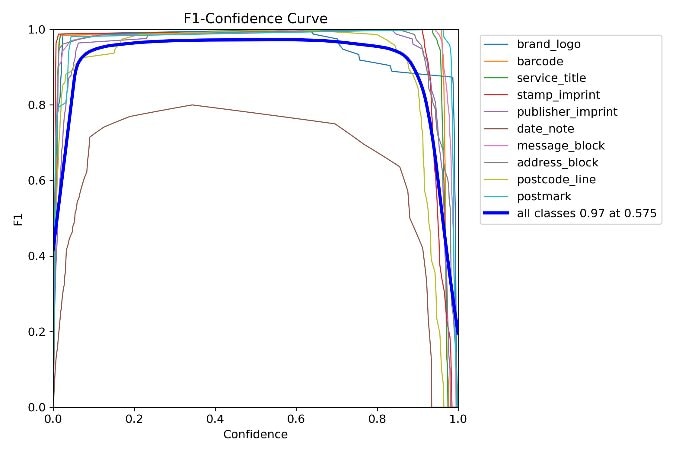
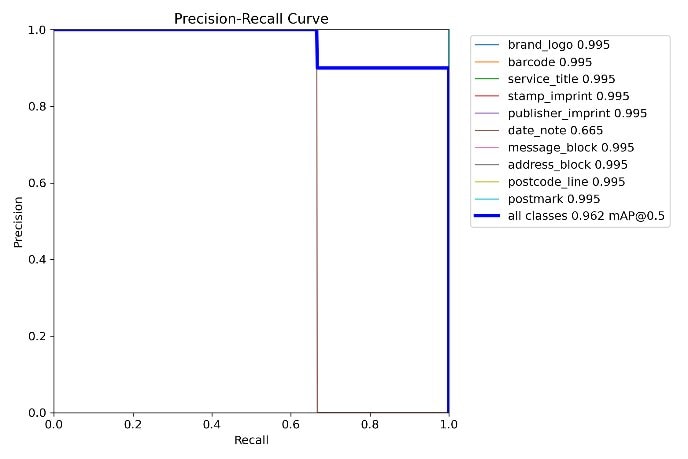
Across all classes, precision was 0.999, recall 1, mAP50 0.995 and mAP50-95 0.88. Every class reached an mAP50 of 0.995. On the stricter mAP50-95, eight classes scored 0.995 and two fell below: postcode_line at 0.93 and date_note at 0.896. F1 peaks at 0.97 at a confidence of about 0.375.
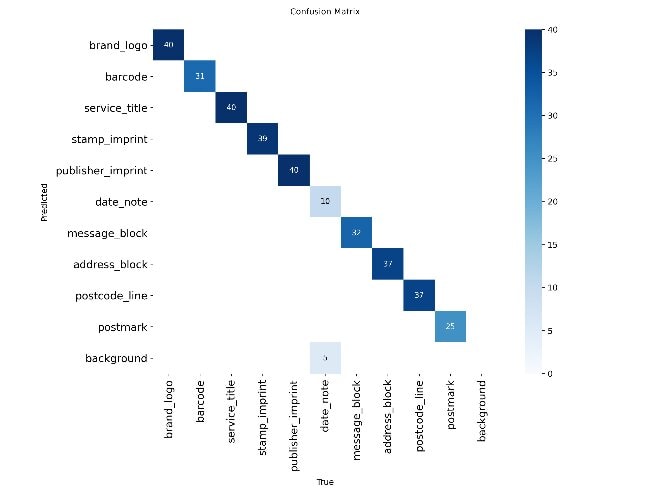
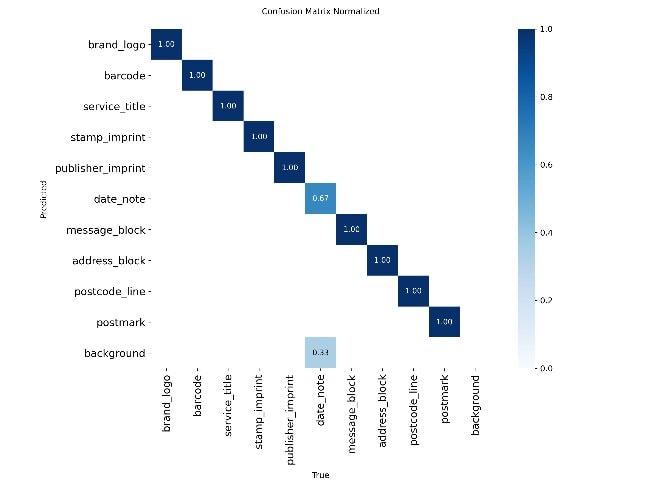
The confusion matrix is almost perfectly diagonal. The one weak spot is date_note, with a normalised recall of 0.67 and some confusion with the background. That's expected: date notes are the smallest and most variable region on a postcard, and none of our real handwritten postcards include one.
The full per-class table and chart, the confusion matrices, the training, F1 and precision-recall curves, and the validation prediction grids are in Appendix A.1 to A.4.
6. The app
LiPi is built in Streamlit and deployed as a public Hugging Face Space, so anyone can try it in a browser without setting anything up.
6.1 Default and Advanced modes
A radio button in the sidebar switches modes. Default shows a summary of the recommended settings and needs no configuration. Advanced exposes the full pipeline: a weights selector (postcard detector v1 or v2, base YOLO11s, base YOLO26n or a custom path), the confidence threshold, the rectifier mode (Hybrid, Learned, Contour or Off), the learned rectifier model, manual rotation, the OCR backend and the postcode lookup country. Both sidebars are shown in Appendix A.5.
6.2 Upload or camera
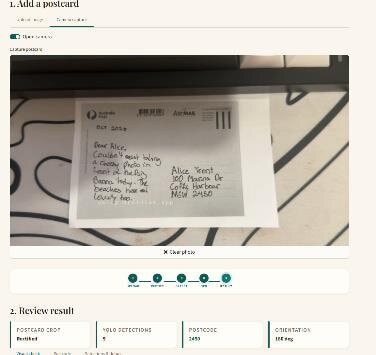
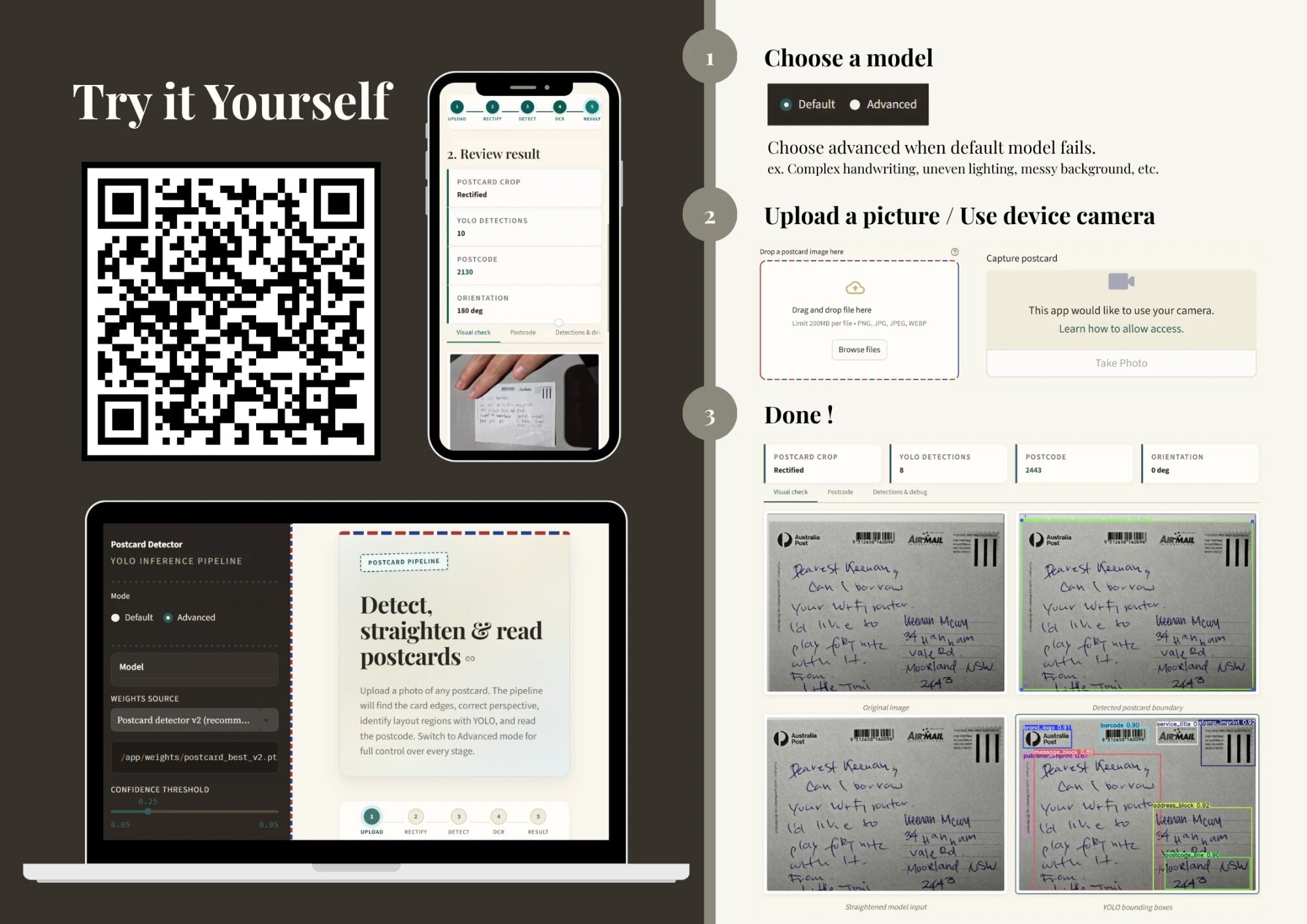
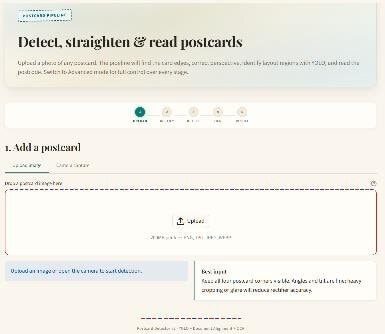
The main area takes an image through two tabs: drag and drop or browse for a PNG, JPG, JPEG or WEBP file, or turn on the webcam and take a photo. The camera tab is the first image at the top of this report, and the upload tab is in Appendix A.5.
6.3 Reading the results
Once an image is in, four tiles show whether the postcard was rectified, how many regions YOLO found, the predicted postcode and the chosen orientation. Below them, the visual check tab shows a two by two grid of the original image, the detected postcard boundary, the straightened input and the YOLO boxes. The second image at the top of this report is a complete result.
7. Limitations
- Mostly synthetic data. Apart from the 110 real postcards, everything is generated, which limits how well the model generalises to irregular handwriting, damaged cards, unusual stamp placement or non-standard layouts.
- A weak class. None of the real handwritten postcards include a date note, which is why
date_notehas the lowest normalised recall (0.67) and mAP50-95 (0.896). - OCR on hard crops. Accuracy drops on very low-resolution crops and heavily stylised handwriting. The Gemini or Groq VLM fallback helps, but it can still fail on difficult perspectives.
- Rectifier failures. The contour rectifier sometimes fails on postcards photographed at extreme angles or against cluttered, high-contrast backgrounds.
- Scope. LiPi only supports four-digit Australian postcodes and a fixed set of ten regions.
- No OCR benchmark. We measured region detection, not end-to-end postcode reading. Without an exact-match table, we can't say how often LiPi reads the postcode correctly.
8. Showcase and People's Choice
On 24 June we set up at stand 1 of the AI Showcase with the arm, a stack of postcards and the demo running on the big screen.
At the Tech Fest awards night, LiPi won the AI Showcase People's Choice Award from the UTS Faculty of Engineering and IT.
9. What's next
On its own, the app turns sorting into three steps: click, read, place. We connected it to a robotic arm that takes the physical step too, which brings it down to one: place the card, and the arm puts it in the right tray.
Beyond that, the report points to three pieces of future work: expanding the real handwritten dataset to cover all ten classes, fine-tuning a dedicated OCR model for handwritten postcodes, and deploying LiPi as an API or on an edge device like a Raspberry Pi so it can slot into a real mailroom.
The bigger takeaway is that synthetic data generation is a viable, privacy-preserving way to build postal document datasets, and that a modern single-stage detector can reach near-perfect localisation on structured documents with modest training resources, at least on our validation split.
Acknowledgements
Thank you to Associate Professor Nabin Sharma, who taught the subject LiPi was built for and guided the project along the way. His work on detecting pincodes with deep CNNs for postal automation [5] is close to what LiPi does.
Appendix
The full diagnostics behind section 5, and the app screenshots from section 6. All detection metrics here are on the 124-image validation split and measure region detection, not postcode reading.
A.1 Per-class detection metrics
Validation performance per class. These metrics measure how well the model locates and classifies regions.
| Class | Precision | Recall | mAP50 | mAP50-95 |
|---|---|---|---|---|
| All classes | 0.999 | 1 | 0.995 | 0.88 |
| brand_logo | 0.999 | 1 | 0.995 | 0.995 |
| barcode | 0.998 | 1 | 0.995 | 0.995 |
| service_title | 1 | 1 | 0.995 | 0.995 |
| stamp_imprint | 1 | 1 | 0.995 | 0.995 |
| publisher_imprint | 0.999 | 1 | 0.995 | 0.995 |
| date_note | 0.999 | 1 | 0.995 | 0.896 |
| message_block | 0.999 | 1 | 0.995 | 0.995 |
| address_block | 0.999 | 1 | 0.995 | 0.995 |
| postcode_line | 0.999 | 1 | 0.995 | 0.93 |
| postmark | 1 | 1 | 0.995 | 0.995 |
A.2 Confusion matrices
Both matrices are almost perfectly diagonal. The exception is date_note, at 0.67 on the normalised matrix.
A.3 Training curves
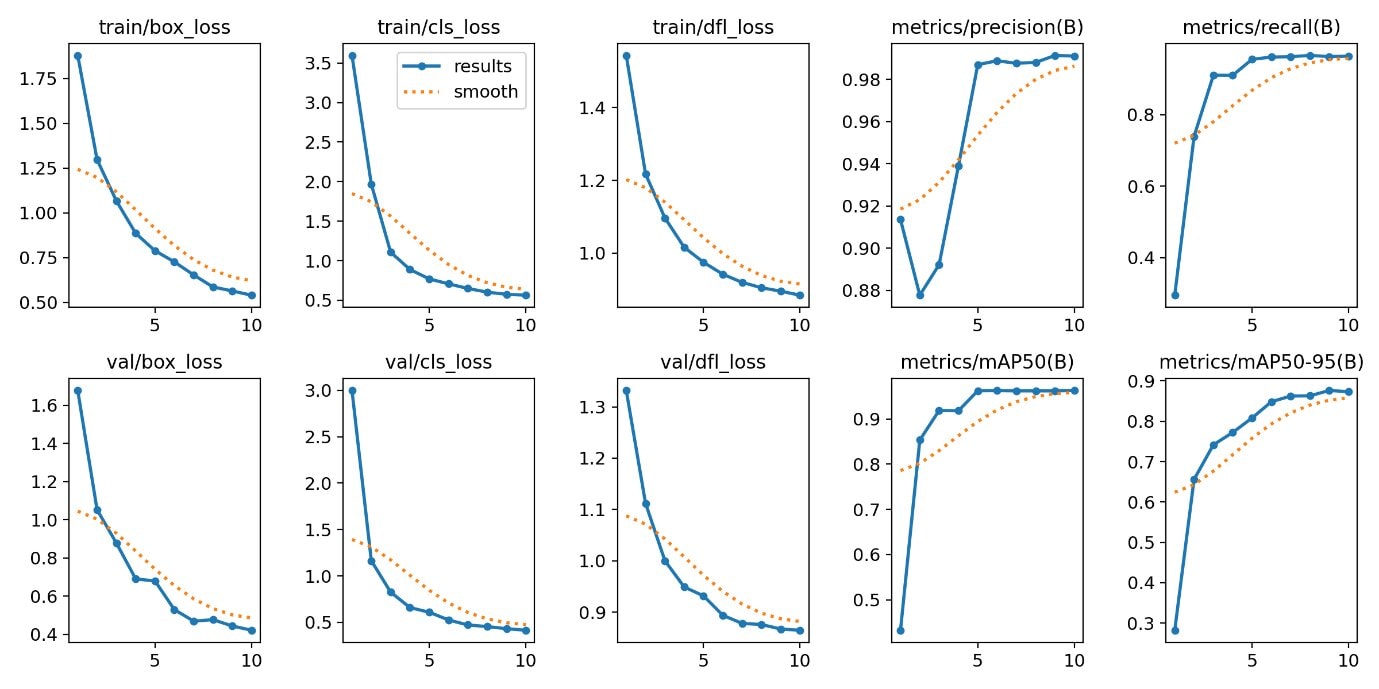
Box, classification and distribution focal losses fall steadily on both training and validation, while precision, recall and mAP climb and level off. Across all classes, F1 peaks at 0.97 at a confidence of about 0.375. On the precision-recall curve, every class reaches an mAP50 of 0.995, with date_note losing some precision at low confidence thresholds because of its size.
A.4 Validation predictions
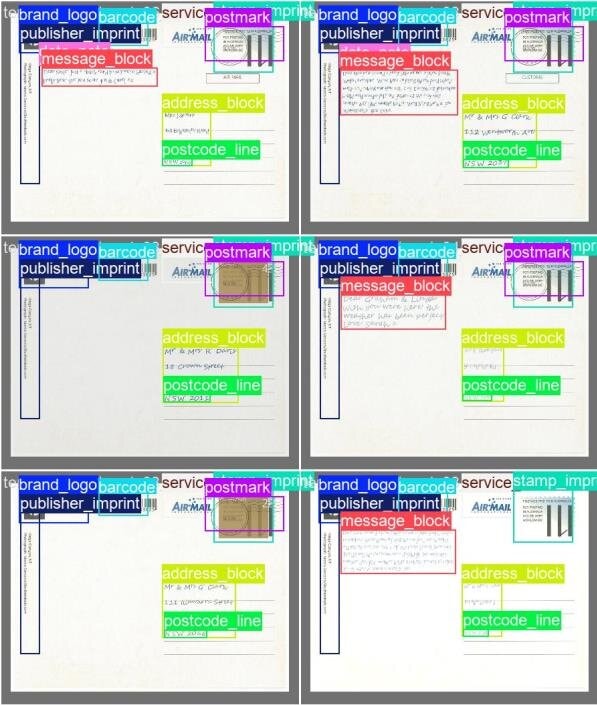
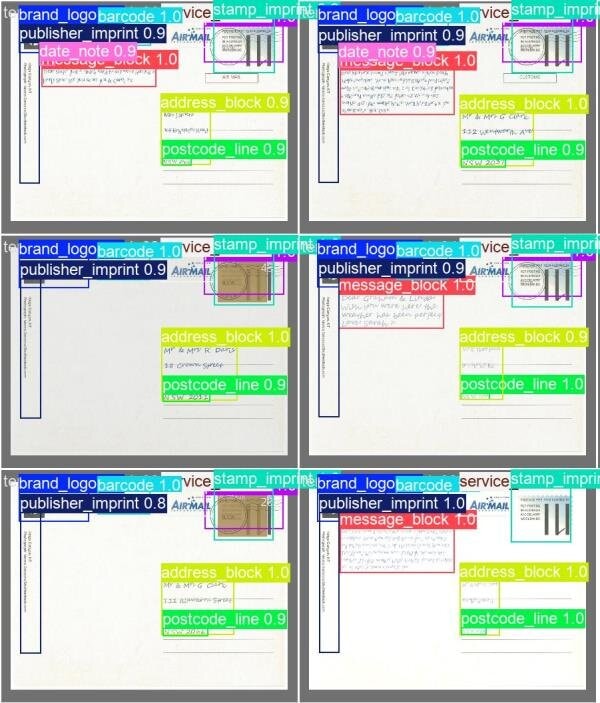
Side by side, the model's predictions on validation postcards line up closely with the hand-labelled ground truth.
A.5 App screenshots
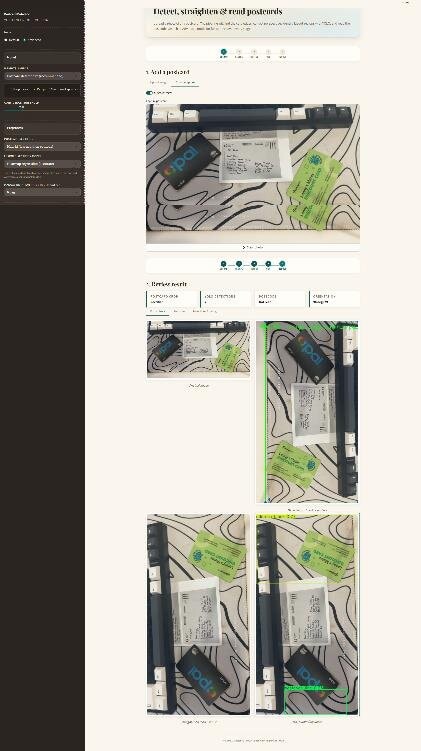
The two sidebar modes from section 6.1 and the upload tab from section 6.2.
References
- Ngu, E. O. Y., & Ali, S. H. A. (2017). Development of handwriting recognition system in postal service sector. jtec.utem.edu.my
- Blumenstein, M., & Verma, B. (1998). A Neural Network for Real-World Postal Address Recognition. In Soft Computing in Engineering Design and Manufacturing (pp. 79 to 83). doi.org/10.1007/978-1-4471-0427-8_9
- Garrido-Munoz, C., & Calvo-Zaragoza, J. On the Generalization of Handwritten Text Recognition Models. CVPR 2025. openaccess.thecvf.com
- Malik, H. N., Shafi, K. M., & Reshi, T. A. (2026). synthocr-gen: A synthetic OCR dataset generator for low-resource languages. arXiv. doi.org/10.48550/arxiv.2601.16113
- Sharma, N., Sengupta, A., Sharma, R., Pal, U., & Blumenstein, M. (2017). Pincode detection using deep CNN for postal automation. In 2017 International Conference on Image and Vision Computing New Zealand (IVCNZ) (pp. 1 to 6). IEEE. doi.org/10.1109/IVCNZ.2017.8402501
Tools: YOLO11s, synthetic data, EasyOCR, Streamlit